
We Accept Crypto Or Rewardable Gift Card Below (We Do NOT Take PayPal)
PDF Instructions Here
Step 1: Go To This:
Rewarble Visa Gift Card Page
Other Websites Buy Card From:
https://skine.com/en-us/rewarble
https://k4g.com/store?q=rewarble
Step 2: Make sure the Region is set to Global (if it isn’t selected already).
Step 3: Choose Amount & Click Add to Cart.
Step 4: Complete payment using any available payment method such as:
• Apple Pay
• Google Pay
• PaySafeCard
• Debit/Credit Card
• CashLib
• BTC
Step 5: After payment, you will receive a digital code.
NOTE: Code Is 16 Digits Mix Letters & Numbers (Example: ZMXTRKPV7N481Q62, This Is Gift Card Code)
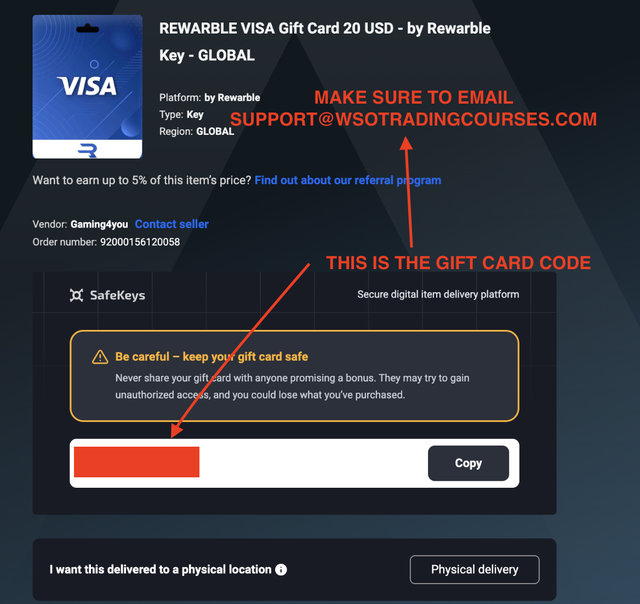
Step 6: Send The Code: [email protected]
Message Us On Telegram @WSOTradingCoursesContact
Step 7: You will receive your course download link instantly.
——————————————————————————————————————
Step By Step Payment Guide For Crypto:
Choose your course and click Buy Now.
Enter your details at checkout.
Select your Crypto.
Complete payment you’ll receive instant access to your online course either Google Drive Link Or Mega Link depending on the course.
Secure Payments Guaranteed
All transactions are encrypted and processed through trusted payment gateways, ensuring your details remain safe.
Pay With Bitcoin / Alt Coins:
Step 1: Enter Your Contact Information
You will be asked to provide your contact information during checkout. This is optional, but we recommend that you provide a valid email address so that we can assist you if there is an issue with your payment.
Step 2: Select Bitcoin & Altcoins As Your Payment Method
Choose the Bitcoin & Altcoin payment option. You will be redirected to a page with a time limit of 20-30 minutes to complete the transaction.
Step 3: Choose Your Payment Currency via Currency
Choose the cryptocurrency you wish to use for the payment. The available options are BTC, ETH, BCH, LTC, and DOGE.
Step 4: Complete The Transaction/Payment
You’ll see the amount to pay, a unique address where you’re supposed to send the funds, as well as a QR code. You can pay by:
- A) Clicking on the wallet button to open a compatible wallet on your device.
B) Scanning the QR code with your mobile wallet.
C) Copying and pasting the amount and address indicated into your cryptocurrency wallet.
A confirmation page will appear shortly after. You may also opt to pay through the Lightning Network.
Step 5: Confirm Transaction/Payment
Your transaction will typically be picked up within seconds once it’s broadcasted to the network. The invoice will first have a ‘Confirming’ status, which will change to ‘Paid and Confirmed.’ Following this, your payment is complete, and your order will be processed.
Why Pay With Cryptocurrency?
Cryptocurrency transactions are quick and easy, often completed in seconds or minutes, far faster than traditional bank transfers. Plus, you won’t need to worry about physical cards or billing details.
Transaction fees for cryptocurrencies vary, but many offer low or negligible costs. For instance, Bitcoin Cash and Litecoin transactions often cost only a fraction of a penny, while Bitcoin may have higher fees due to miner costs.
Cryptocurrencies are not limited by restrictions—whether you’re paying locally or globally, the transaction time and cost remain consistent.
Using cryptocurrency also offers privacy benefits. Wallet addresses are not tied to personal identities, so aside from your email address, no other personal information is required.
Where Can I Buy Cryptocurrencies?
You can buy many cryptocurrencies using a credit card or bank transfer on platforms like Binance, Luno, Coinbase, Kraken, Gemini, ByBit and many more exchanges.
We suggest doing your own research before purchasing.
For further assistance, please email us at [email protected] or visit our Contact Us page.